If you are going to design an app icon for the application you are working on and would like to know where you can get the iOS guidelines, then head over to this link:
developer.apple.com/design/resources/
You will find iOS UI kit Figma & Sketch, and most importantly, the App icon template for both vector-based graphics and raster-based graphics. Photoshop and Illustrator templates are also available.
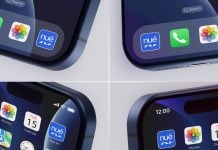
We have also created the below iOS app icon logo mockup according to the guidelines of Apple. The resolution of the wallpaper is bigger because of the close-up view, and we did not want anything to pixelate, so everything looks perfect on 100% preview. Place your artwork on a smart object, but you need to first go to the first smart object to insert your favorite wallpaper, and then insert your App icon design, which will seamlessly show you once you save both smart objects. You will also be able to change any other icon. Moreover, the background color is changeable. This free iOS App icon mockup is rendered with Cycles.

Description:
Available Format: Layered PSD easy smart object insertion
License: Free for personal and commercial use
Zip File Includes: Photoshop PSD file
Mockup Resolution: 4500 x 3000 px
Created by Goodmockups.com
Instructions:
1. Place your app design on smart object
2. Photoshop requirement: Adobe Photoshop CS5+